


Google Photos is generally more convenient for people who use Android, iPhone, and different types of devices, while iCloud Photos offers particularly smooth integration with Apple's Photos app. Google provides 15 GB of free storage shared across its services, compared with Apple's 5 GB of free iCloud storage. Both offer paid plans, photo sharing, and ways to keep a large photo library accessible online.
However, the right choice depends on more than free storage. Photo quality, device compatibility, family sharing, deletion behavior, and the cost of storing years of pictures can all affect the decision.
This guide explains those differences and helps you decide whether to pay for Google One, iCloud+, or neither.
Key Takeaways
- Google Accounts include 15 GB of free storage shared across Google Photos, Gmail, and Google Drive.
- Apple provides 5 GB of free iCloud storage, with iCloud+ upgrades starting at 50 GB.
- Google Photos works on Android, iPhone, iPad, and through a web browser. iCloud Photos is closely integrated with Apple devices but is also accessible through Windows and supported browsers.
- Apple stores original-resolution photos in iCloud Photos. Google Photos offers Original quality and space-saving backup options.
- Deleting a photo from a synchronized library can remove it from more places than expected.
- You should keep an independent copy of important photos rather than relying exclusively on one synchronized cloud library.
What Is the Difference Between Google Photos and iCloud Photos?
Both services store digital photos and videos online, but they are designed around different account ecosystems.
What is Google Photos?
Google Photos is a photo and video management service connected to your Google Account.
It lets you back up images, organize albums, search your library, and access supported photos across different devices.
You can use Google Photos on Android devices and iPhones or access your library through Google Photos on the web.
When backup is enabled, supported photos and videos are uploaded to the Google Account you've selected.
The available storage comes from the same account allowance used by Gmail and Google Drive.
If you need more capacity, you can purchase additional storage through Google One.
Google also provides features such as shared albums and Partner Sharing, allowing selected photos to be shared with another person.
What is iCloud Photos?
iCloud Photos is Apple's photo synchronization service.
It works with the Photos app on supported iPhones, iPads, Macs, and other compatible devices.
When you enable iCloud Photos, your photo library is stored in iCloud and synchronized across devices using the same Apple Account.
Changes to the library, including supported edits and deletions, are reflected across those devices.
Apple explains this behavior in its iCloud Photos setup guide.
Photos can also be accessed through iCloud.com and the iCloud for Windows application.
Unlike a separate backup archive, iCloud Photos is designed to keep a synchronized photo library.
That distinction becomes particularly important when deleting pictures.
Google Photos vs iCloud Photos: Feature comparison
| Feature | Google Photos | iCloud Photos |
|---|---|---|
| Free cloud storage | 15 GB shared across Google services | 5 GB shared across iCloud services |
| Paid storage | Google One plans | iCloud+ plans |
| iPhone support | Yes | Yes, built into Apple Photos |
| Android support | Native Android app | Web access, with more limited integration |
| Windows access | Web browser | iCloud for Windows and browser |
| Original-quality storage | Available when Original quality is selected | Original-resolution library stored in iCloud |
| Storage-saving options | Storage saver for eligible uploads | Optimize device storage while originals remain in iCloud |
| Family storage sharing | Available on eligible Google One plans | Available through iCloud+ Family Sharing |
| Photo sharing | Albums and Partner Sharing | Shared Albums and Shared Photo Library |
| Migration | Supported transfer/export tools | Supported transfer/export tools |
The biggest differences involve device integration, storage allocation, and how each service manages your photo library.
Neither product guarantees that every photo is protected from accidental deletion, account problems, or service disruptions.
Google Photos vs iCloud Pricing: Which Costs Less?
Price matters when a photo library becomes too large for a free account.
But the two providers do not offer identical storage tiers.
Free storage
Google provides 15 GB of free account storage.
Apple provides 5 GB of free iCloud storage.
On paper, Google offers three times as much free capacity.
However, Google Photos shares that space with Gmail and Google Drive.
Similarly, iCloud storage is used by other eligible Apple services, including device backups, iCloud Drive, and synchronized data.
The amount available specifically for photos depends on how much space those other services already use.
For someone with a large Gmail account, Google's 15 GB may fill sooner than expected.
For someone who regularly backs up an iPhone, Apple's 5 GB can also become insufficient quickly.
Current paid storage plans
The following comparison uses standard US monthly prices displayed on the official provider websites on November 5, 2026.
| Provider | Storage plan | US monthly price |
|---|---|---|
| Apple iCloud | 5 GB | Free |
| Apple iCloud+ | 50 GB | $0.99 |
| Apple iCloud+ | 200 GB | $2.99 |
| Apple iCloud+ | 2 TB | $9.99 |
| Google Account | 15 GB | Free |
| Google One Basic | 100 GB | $1.99 |
| Google AI Plus | 2 TB | $9.99 |
These are the selected plans visible in the official US listings reviewed, not an exhaustive list of every offer or personalized subscription option.
Google's displayed 2 TB plan also bundles AI-related features, so it is not identical to Apple's iCloud+ package.
Apple additionally advertises larger 6 TB and 12 TB plans.
Sources: Google One plans and Apple iCloud+ plans.
Prices can change, and subscription availability, taxes, currency, and bundled benefits differ by country.
Readers in the UK, Australia, Canada, and other markets should check their local provider pricing rather than assuming US-dollar rates apply.
Which plan is better value?
Consider three common situations.
You need less than 50 GB.
Apple's 50 GB paid tier may be a sensible low-cost upgrade for an existing iCloud user.
A Google user whose combined Gmail, Drive, and Photos data remains below 15 GB may not need to pay anything.
You need around 100 GB.
Google's 100 GB Basic plan may be enough if your other Google services do not consume too much storage.
Apple's 50 GB plan might be too small, making its 200 GB tier more practical.
You need approximately 2 TB.
Both companies advertised a 2 TB option at $9.99 per month in the checked US pricing.
At that capacity, the more important questions may be device integration, sharing features, other included services, and whether you already pay for one ecosystem.
A cheaper starting plan is not automatically the better long-term purchase.
Which Is Better for iPhone, Android, and Windows Users?
Device compatibility often has a greater effect on everyday convenience than minor differences in subscription pricing.
For iPhone users
iCloud Photos is closely integrated with the built-in Photos app.
You do not need to manage a separate photo library interface to use its main features.
When iCloud Photos is enabled, photos and videos can synchronize across an iPhone, iPad, and Mac linked to the same Apple Account.
Apple's Optimize Storage setting can keep smaller device copies while retaining the original-resolution files in iCloud.
Google Photos also works on iPhone.
It may be especially useful if you want access to your photos from Android devices, use a Google Account as your main online identity, or prefer Google's organization and sharing tools.
However, Google Photos on iPhone is not the same service as Apple's built-in iCloud Photos synchronization.
If both are enabled, understand which application is managing the photos and where they are being uploaded.
For Android users
Google Photos is generally the more straightforward starting option on Android.
The application is available directly on supported Android devices and can back up photos into a Google Account.
Users can manage albums, access backed-up photos, and use the service's storage-management tools.
iCloud Photos does not offer equivalent native Android integration.
Android users can access supported iCloud content through a browser, but that is not the same as having Apple's full Photos app and synchronization experience.
For Windows users
Both services offer access from Windows, but through different workflows.
Google Photos is available through a web browser.
Apple provides iCloud for Windows, which can display photos and videos stored in iCloud Photos and integrate with Windows File Explorer.
According to Apple's iCloud for Windows documentation, supported users can access photos, files, and other iCloud content from a Windows computer.
Therefore, describing iCloud Photos as completely unavailable on Windows would be inaccurate.
For mixed-device households
A household containing Android phones, iPhones, and Windows computers may benefit from the cross-platform availability of Google Photos.
An Apple-focused family may prefer iCloud Photos and Apple's integrated sharing features.
The practical question is whether every household member can comfortably access, contribute to, and manage the intended photo collection.
The answer depends on the devices and the specific sharing method.
Photo Quality, Sharing, and Privacy: Important Differences
Storage size is only one part of keeping a photo library usable over time.
Original photo quality
Apple's iCloud Photos stores supported photos and videos in their original formats and at full resolution.
Its Optimize Storage feature can reduce local device storage requirements without intentionally reducing the quality of the original cloud files.
Google Photos gives users different backup-quality options.
With Original quality, supported photos and videos are stored without intentionally reducing the resolution or quality.
With Storage saver, eligible photos and videos may be compressed or resized to consume less storage.
Google explains the differences in its photo backup-quality documentation.
If preserving the original quality of photographs or videos is important, review the selected backup setting before uploading a large collection.
For professional work, RAW photography, or valuable personal archives, keep a separate original-file backup as well.
Searching and organizing photos
Google Photos provides tools to search and organize a library using photo content and metadata.
For example, users may be able to search for subjects, locations, or people, depending on available features and settings.
Apple Photos also offers library organization, search, albums, and editing tools.
Rather than assuming that one service is universally more accurate, consider which interface helps you find the photographs you need.
Search features can change with application updates, language support, region, and device capabilities.
Sharing with family members
Google Photos offers shared albums and Partner Sharing.
Partner Sharing lets eligible users share all photos or a selected subset with another Google Account.
Some selection features vary by region.
Apple offers Shared Albums and iCloud Shared Photo Library, which are distinct features.
Its Shared Photo Library allows a group of up to six people, including the organizer, to collaborate on a common collection.
According to Apple's Shared Photo Library guidance, participants can add, edit, and delete items in that shared collection.
This makes the sharing settings important. A shared library is not necessarily a read-only photo album.
Also, paying for a shared storage plan does not automatically combine every family member's private photos.
Storage sharing and photo-library sharing are separate choices.
Privacy and account protection
Both platforms provide account and cloud security features.
However, it would be misleading to claim that either service offers complete privacy or protection from every risk.
Google describes encryption for data in transit and at rest.
Apple also encrypts iCloud data and offers additional protection through Advanced Data Protection, where available and enabled.
According to Apple's iCloud security documentation, Advanced Data Protection extends end-to-end encryption to iCloud Photos and other data categories.
That protection requires compatible devices and recovery arrangements, and certain sharing features have exceptions.
Strong account authentication, recovery information, and careful sharing permissions matter regardless of the platform.
Does Deleting a Photo Remove It From the Cloud?
This is one of the most important questions to understand before choosing a service.
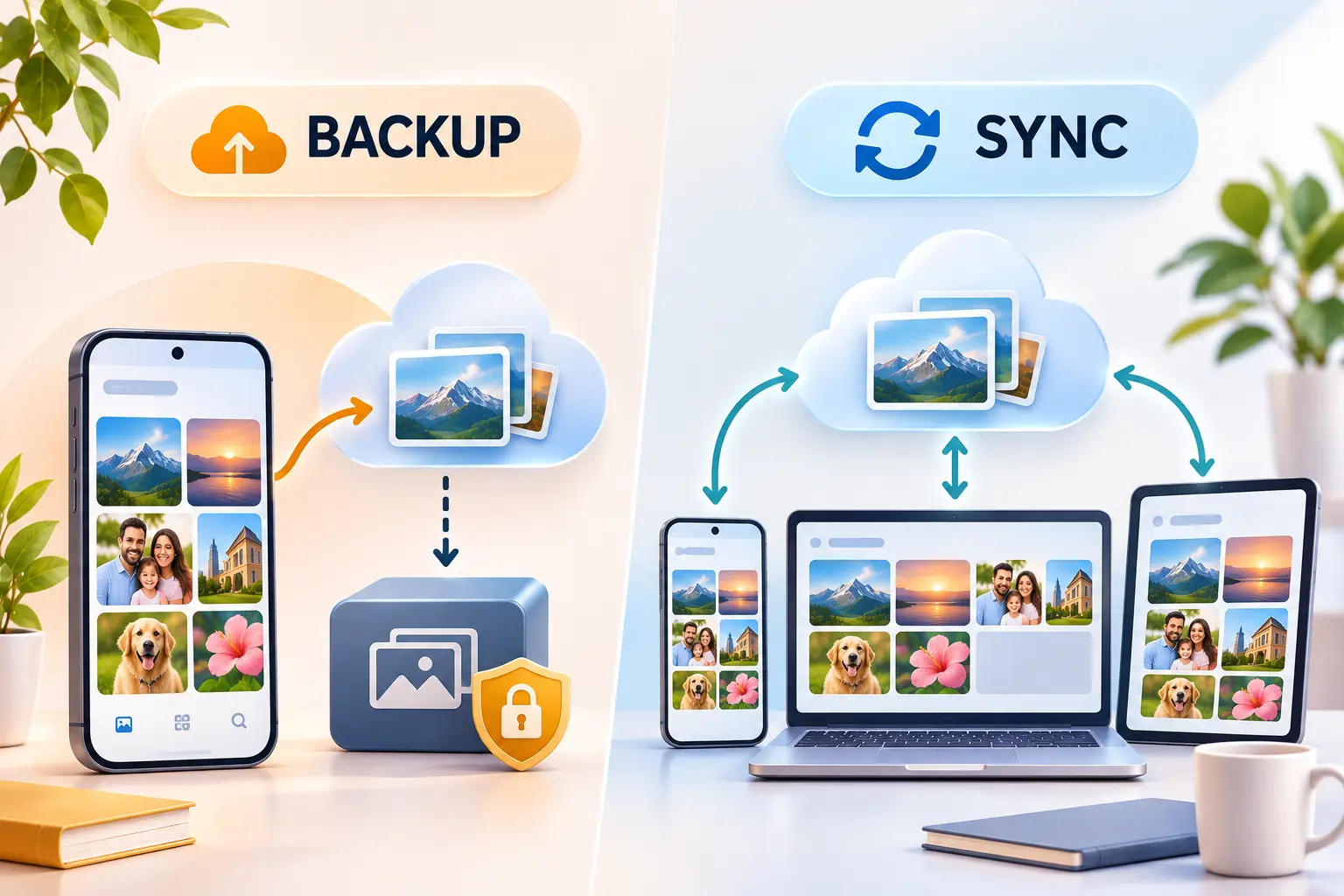
A synchronized photo library is not necessarily a separate, permanent backup.
What happens with iCloud Photos?
When iCloud Photos is enabled, deleting a photo from a synchronized device generally removes it from other devices using that iCloud Photos library.
Apple provides a Recently Deleted folder for a limited recovery period, but that is not a replacement for independent backup storage.
Apple explicitly explains that items synchronized through iCloud Photos are not duplicated within the device's iCloud Backup.
Example: You delete an old photograph from your iPhone because you want more available storage.
If it is part of your synchronized iCloud Photos library, that deletion can also remove it from iCloud and your other synchronized devices.
To save device storage while keeping the library, consider Apple's supported Optimize Storage feature instead of manually deleting valuable pictures.
What happens with Google Photos?
Google Photos also requires care when deleting images.
Deleting a photograph through the Google Photos interface can remove it from the backed-up library and synchronized devices.
However, Google offers a separate Free up space on this device feature.
That tool is designed to remove supported local copies that are already backed up while preserving their cloud copies.
Google explains this in its official device-storage guide.
The difference between deleting a photo and freeing up device space is essential.
Do not assume that removing a photograph from any gallery app will always have the same effect.
Review the official instructions for your operating system and application version.
Why a separate backup still matters
A cloud photo library provides valuable convenience and recovery options, but it should not be the only copy of irreplaceable photographs.
A safer personal archive can include:
- Your main photo library on a device or cloud service.
- A separate copy stored independently.
- Periodic checks that important files are accessible.
- Clear account recovery arrangements.
For example, someone might keep synchronized photos in iCloud while periodically exporting an independent copy to an external drive.
The separate copy should not simply mirror every deletion made in the primary library.
If you want to organize your broader collection of files and documents, Spread Thoughts has a guide to decluttering your digital life.
Can You Transfer Photos Between Google Photos and iCloud?
Yes. Both companies document ways to transfer supported photos and videos.
However, a transfer does not necessarily reproduce every detail of the original library.
Moving from iCloud Photos to Google Photos
Apple provides a process for requesting a copy of eligible iCloud Photos content to be transferred to Google Photos.
The request can be initiated through Apple's privacy and data tools, where available.
The transfer does not automatically delete the originals from iCloud.
But there are limitations.
According to Google's official transfer documentation, some shared albums, smart albums, and parts of Live Photos are not transferred in the same form.
You must also have enough Google Account storage for the imported content.
Moving from Google Photos to iCloud Photos
Google offers an export-and-transfer service through Google Takeout for supported destinations.
Apple also documents direct transfers from Google Photos to iCloud Photos for eligible accounts.
The transfer may be restricted for some account types or configurations.
For example, Apple's documentation states that direct import to iCloud Photos is unavailable while Advanced Data Protection is enabled for the receiving account.
See Apple's Google Photos transfer guidance for the applicable requirements.
Migration checklist
Before switching, check that you have enough destination storage, verify the supported formats, and preserve your existing library.
After the transfer, compare representative photos, videos, albums, and important metadata.
Check that special formats such as Live Photos or RAW files retained the information you expected.
Do not delete the original collection or cancel the original service until you have verified the new library.
A one-time transfer also does not mean the two platforms will automatically synchronize future photographs.
Which Photo Storage Service Should You Choose?
Use your devices, storage needs, and budget to guide the decision.
| Your situation | Sensible starting choice |
|---|---|
| You use mostly Apple devices | Evaluate iCloud Photos |
| You use Android and Windows | Evaluate Google Photos |
| Your household uses multiple device brands | Evaluate Google Photos for cross-platform convenience |
| You need a small paid iCloud upgrade | Consider iCloud+ 50 GB |
| You want a 100 GB Google account allowance | Consider Google One Basic |
| You need around 2 TB | Compare current plans and the services bundled with them |
| You want to preserve original-quality photos | Verify the original-quality settings and maintain independent copies |
| You want to move an existing large library | Verify migration compatibility before switching |
When Google Photos may be the better fit
Google Photos may be a practical choice if you frequently move between Android, iPhone, and Windows devices.
It can also suit someone who already relies heavily on Google services and prefers managing photos through the same account.
The 15 GB free storage allowance is a useful starting point, although it must be shared with Gmail and Google Drive.
When iCloud Photos may be the better fit
iCloud Photos may be preferable for someone whose primary devices are an iPhone, iPad, and Mac.
Its direct integration with Apple Photos and device-storage optimization makes it convenient to manage one synchronized library.
The lower-cost 50 GB tier may also be attractive if you need only a modest increase in cloud storage.
When you may not need to pay
If your existing free storage is sufficient, there may be no reason to purchase additional capacity.
Review unused files, duplicates, unnecessary videos, and available storage-management tools before upgrading.
However, avoid deleting photos merely to stay on a free plan without understanding synchronization and recovery behavior.
For valuable memories, preserving reliable copies is more important than saving a small monthly fee.
Frequently Asked Questions
1. Is Google Photos better than iCloud Photos?
Neither is universally better. Google Photos may be more convenient across Android, iPhone, and other devices, while iCloud Photos offers closer integration with Apple's Photos app and supported Apple devices.
2. Is Google Photos free for iPhone users?
Yes. Google Photos can be used on supported iPhones with a Google Account. The free Google Account allowance is 15 GB shared with Gmail and Google Drive. Additional storage requires an eligible paid plan.
3. Does iCloud Photos reduce photo quality?
Apple stores supported original-resolution photos in iCloud Photos. Optimize Storage can keep smaller versions on a device to save local space while retaining the originals in iCloud.
4. Can I use both services on the same iPhone?
Yes, but they are separate services. Using both can consume storage in two cloud accounts, and the same photos may be uploaded to both. Understand each service's backup, sync, and deletion settings before enabling both.
5. Which service is better for family photo sharing?
It depends on the devices your family uses and the type of sharing required. Google Photos offers shared albums and Partner Sharing. Apple offers Shared Albums and a collaborative Shared Photo Library for eligible users.
6. Can I move all my photos from iCloud to Google Photos?
You can transfer many supported photos and videos, but some formats, edits, albums, and metadata may not transfer completely. Keep the original library until you have verified the destination.
7. Do I need Google One if I already pay for iCloud+?
Not necessarily. If iCloud Photos meets your storage and device needs, paying for Google One may be unnecessary. A separate Google plan can still be useful when you need more Gmail or Drive storage or want a second photo service for a distinct purpose.
Final Verdict
Google Photos and iCloud Photos both provide useful ways to store, organize, and access digital photographs.
For a mixed-device household, Google Photos may offer a more convenient cross-platform experience.
For someone mainly using Apple devices, iCloud Photos may fit more naturally into everyday photo management.
Before upgrading, compare the storage you actually need, your existing subscriptions, and the consequences of deleting or transferring photos.
The best choice is the service that fits your devices and budget while allowing you to keep your important memories safely accessible.


